PepMod is a private tracker for iPhone and Android. Build your protocol, log each entry, get reminders and see your adherence over time. It keeps the record you give it; it doesn’t tell you what to take.
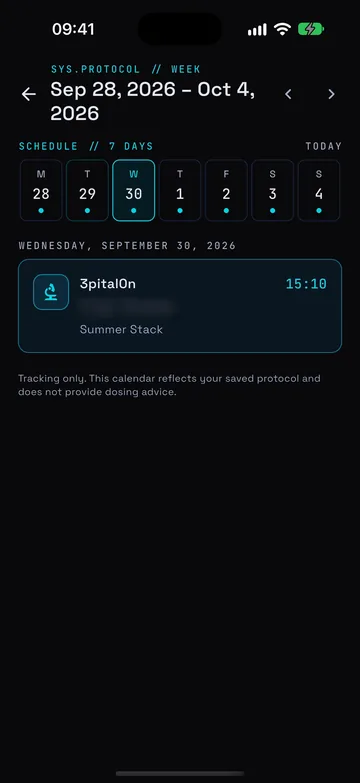
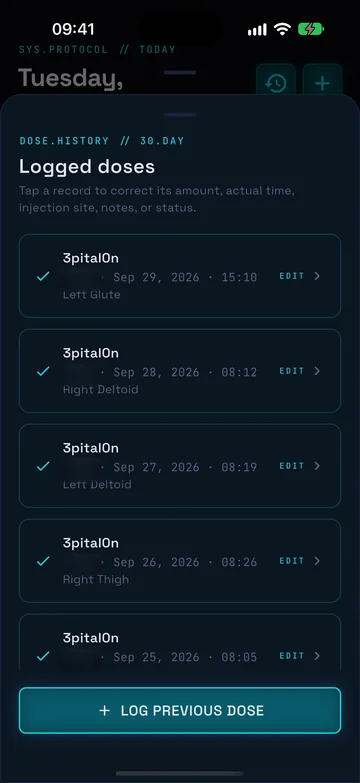
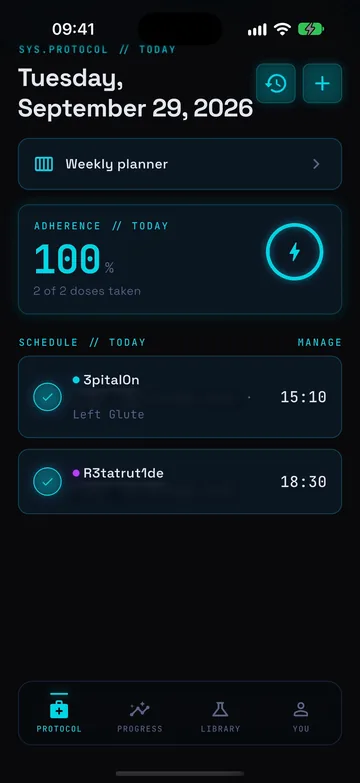
Real app screens from the iOS Simulator with sample data; amounts are blurred.
What PepMod does
Your protocol, your log, one place.
Most people start with a notes app or a spreadsheet. PepMod replaces both with a schedule that reminds you, a log you can correct and charts that show how consistent you’ve been.
SYS.PROTOCOL // TODAY
Know what’s due today, and log it as you go.
The Today screen lists every entry scheduled from your active protocols with its time, plus your adherence for the day. Mark an entry taken or skipped, or undo it, and add the actual time, site or a note if you want the detail.
Taken, skipped and undo on every entry
Optional time, site and notes per log
Adherence for the day at the top
SYS.PROTOCOL // WEEK
See the next seven days of your saved protocol.
The weekly planner lays out each day of the week from the schedule you set up: daily, every other day, twice weekly, weekly or as needed. It is a calendar of your own plan, nothing more.
Day-by-day view of what you scheduled
Daily, every-other-day, twice-weekly, weekly or as-needed
States plainly that it doesn’t give dosing advice
DOSE.HISTORY // 30.DAY
A 30-day record you can actually correct.
Every log lands in your dose history. Tap a record to fix its amount, actual time, site, notes or status, or add an entry you forgot with Log previous dose, so the record matches what really happened.
30 days of logged entries
Edit any record after the fact
Log a previous entry you missed
Spec sheet Everything else in the app
01ProtocolsBuild a protocol from the reference library or a custom name: the amount and unit you were given, frequency, start date, cycle length and the times of day.
02RemindersLocal notifications on your phone for upcoming entries while a protocol is active.
03ProgressAdherence, current streak, total entries logged and a 30-day adherence chart, with weight and body measurements alongside.
04ReferenceA searchable, educational peptide reference library inside the app.
05Unit converterConvert between mg, mcg and mL in the app, the same arithmetic as the web calculator below.
06ExportExport your protocols, recent logs and body metrics from the You tab to keep your own copy.
Free tool // runs in your browser
Free peptide calculator for the unit maths.
Convert mg to mcg exactly, work out a solution’s concentration from its total mass and final volume, and find the volume that holds an amount, or the reverse. Every step is shown, nothing you type is stored, and it never suggests an amount.
Hypothetical round numbers to show the arithmetic. Not a dose.
How it’s built
Records, not recommendations.
It keeps your record
PepMod stores the protocol, amounts and times you enter. It doesn’t recommend peptides, amounts, cycles or protocols, and it isn’t medical advice.
Your account, your data
Protocols, logs and body metrics are saved to your own account (sign in with Apple or email) and only your account can read them. Details are in the privacy policy.
Same app on both phones
One design on iPhone and Android, so switching phones doesn’t mean learning a new app.
FAQ
Questions people ask about PepMod
01
What is PepMod?
PepMod is a peptide protocol tracker app for iPhone and Android, made by GymStreak Labs. You build a protocol, log each scheduled entry as taken or skipped, get reminders for upcoming entries, and see adherence, streaks, weight and body measurements over time.
02
Does PepMod tell me what to take?
No. PepMod records the protocol and amounts you enter. It does not recommend peptides, amounts, cycles or protocols, and it is not medical advice. Follow the instructions of your prescriber or healthcare professional.
03
Is PepMod available on Android?
Yes. PepMod is on the App Store for iPhone (iOS 15.0 or later) and on Google Play for Android, with the same design on both.
04
How do reminders work?
While a protocol is active, PepMod schedules local notifications on your phone for the upcoming entries in your schedule. You can then log, skip or undo each entry from the Today screen.
05
Can I fix a log I got wrong, or add one I forgot?
Yes. The dose history shows the last 30 days. Tap a record to correct its amount, actual time, site, notes or status, or use Log previous dose to add an entry after the fact.
06
Can I export my records?
Yes. Export data on the You tab exports your protocols, recent dose logs and body metrics so you can keep your own copy.
07
Where are my records stored?
Protocols, dose logs and body metrics are saved to your PepMod account, which you sign in to with Apple or email, and only your account can read them. The privacy policy explains what else the app collects.
08
How much does PepMod cost?
PepMod offers premium features through an auto-renewing in-app subscription. Current plans and prices are shown in the app before you subscribe, and you manage or cancel the subscription in your App Store or Google Play account.
09
Are the tools on this site free?
Yes. The peptide calculator, mg to mL calculator, mcg to mg converter and protocol calendar are free and need no account. They run in your browser and do not store or send what you type. The app has its own unit converter as well.
10
Who makes PepMod?
PepMod is made by GymStreak Labs, the team behind GymStreak and GymLevels. The legal entity and App Store seller is GymStreak Ltd. You can reach the team at support@gymstreak.com.
Download
Get PepMod on your phone.
For iPhone (iOS 15.0 or later) and Android. For adults 18+.