
Free tool runs in your browser
Peptide Protocol Calendar: Turn your start date and schedule into a calendar, a printable log and phone reminders
The short answer
Pick your start date, the schedule pattern you were given and the cycle length in weeks. The calendar marks every scheduled day using the same rules as the PepMod app: every other day counts from your start date, 2x per week is Monday and Thursday, and weekly repeats on your start weekday. Then print a log with blank columns for what you actually take, or download an .ics file to get reminders in your phone’s calendar.
Scheduling only, not medical advice. The tool lays out the schedule you enter; it never suggests an amount, a pattern or a cycle length. Follow your prescriber’s or healthcare professional’s instructions.
Privacy The calendar, printout and .ics file are made in this browser tab. No account, storage, cookies, analytics or network requests.
01 Schedule rules
How each schedule pattern counts days
Every pattern starts on your start date and stops at the end of the cycle (start date + weeks × 7 − 1). Nothing is ever scheduled before the start. Each scheduled day gets one log row per time of day.
- Daily
- Every day from the start date. Same rule as the PepMod app.
- Every other day
- The start date, then every second day after it (day 0, 2, 4 …). Same rule as the PepMod app.
- 2x per week
- Every Monday and Thursday on or after the start date. Same rule as the PepMod app.
- Weekly
- The start date, then every 7 days (the same weekday as the start). Same rule as the PepMod app.
- Custom days
- Only the weekdays you tick, on or after the start date. Same rule as the PepMod app.
- Days on / days off
- A repeating block: N days on, then M days off, counted from the start date. Web-only: the app doesn’t have this pattern.
Days are counted as calendar dates, so a daylight-saving change never shifts a day. The rules are ported from the app’s own schedule code and covered by automated tests.
02 Worked examples
Worked examples
Generic dates chosen to show how the rules count. They are not a suggested schedule. The dates below are generated by the same code that runs the calendar.
Schedule example A
Every other day counts from the start date
A schedule starts on Wednesday 4 March 2026, every other day, for a 2-week cycle.
- Wed 4 Mar
- Fri 6 Mar
- Sun 8 Mar
- Tue 10 Mar
- Thu 12 Mar
- Sat 14 Mar
- Mon 16 Mar
7 scheduled days. Each is two days after the last, whatever the weekday.
Schedule example B
2x per week is always Monday and Thursday
The same Wednesday start with 2x per week, for 2 weeks.
- Thu 5 Mar
- Mon 9 Mar
- Thu 12 Mar
- Mon 16 Mar
4 scheduled days, all Mondays and Thursdays. The start date itself isn’t one, because it’s a Wednesday.
Schedule example C
Days on, days off
A Monday 2 March 2026 start with 5 days on and 2 days off, for 2 weeks, twice a day.
- Mon 2 Mar
- Tue 3 Mar
- Wed 4 Mar
- Thu 5 Mar
- Fri 6 Mar
- Mon 9 Mar
- Tue 10 Mar
- Wed 11 Mar
- Thu 12 Mar
- Fri 13 Mar
10 scheduled days with 2 times each, so 20 log rows.
03 Print + reminders
Printing the log and adding reminders
- Print or save as PDF straight from the browser. Only the calendar and the log are printed.
- The Scheduled column is filled in from your pattern. Date, Time, Amount and Notes are left blank on purpose so you write what actually happened.
- The tally at the bottom counts the rows you ticked, the same idea as adherence in the app.
- The .ics file is a standard iCalendar file: one event per scheduled time, each with an alert at that time. Times are “floating”, so 08:00 stays 08:00 in whatever time zone your phone is in.
File format: IETF RFC 5545: the iCalendar (.ics) format.
04 In the app
The same schedule in PepMod
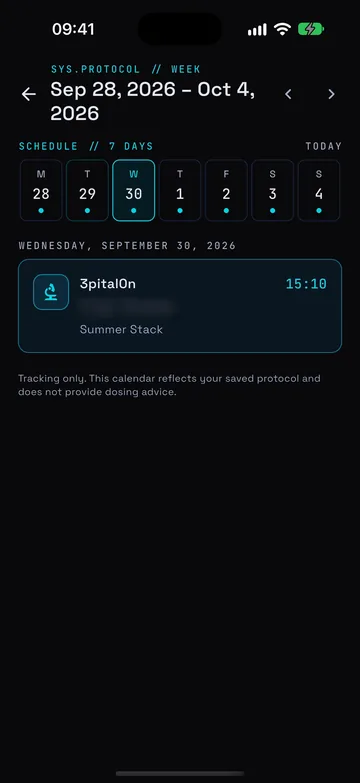
In PepMod you set the same things when you build a protocol: the start date, the pattern (daily, every other day, 2x per week, weekly, custom days or as needed), the cycle length and the time. The weekly planner then shows the next seven days, local reminders fire on your phone, and each entry is logged as taken or skipped, with adherence and streaks worked out for you.
Like this page, the app records the protocol and amounts you enter. It doesn’t tell you what to take.
05 FAQ
Protocol calendar FAQ
How do I make a peptide schedule calendar?
Enter a start date, choose the schedule pattern you were given (daily, every other day, 2x per week, weekly, custom weekdays or days on / days off), set the cycle length in weeks and the times of day. The calendar marks every scheduled day, and you can print a log or download reminders.
Does “every other day” follow the calendar or my start date?
Your start date. Day 0 is the start, then day 2, day 4 and so on, the same rule PepMod uses. Across a month end it simply carries on counting, so 31 January is followed by 2 February.
Which days does “2x per week” use?
Monday and Thursday, the same as the 2x per week setting in the PepMod app. To use other weekdays, choose Custom days and tick the ones you want.
How do I add the reminders to my phone calendar?
Download the .ics file and open it. On iPhone or Mac it opens in Apple Calendar; in Google Calendar use Settings › Import; Outlook opens it directly. Each scheduled time becomes an event with an alert at that time. Some calendar apps ignore alerts in imported files, so check one event after importing.
Why are the amount and notes columns blank?
Because this tool never suggests or fills in an amount. The log is for you to record what you actually took and when, from your own instructions.
Is anything I type saved or sent anywhere?
No. The calendar, printout and .ics file are all made in your browser. Nothing is uploaded, stored or tracked, and closing the page clears it.
Can the PepMod app do this for me?
Yes, for the patterns the app supports: daily, every other day, 2x per week, weekly, custom days and as needed. It sends local reminders on your phone, lets you log each entry as taken or skipped, and tracks adherence and streaks. The days-on / days-off pattern is only on this web tool.
Does the calendar suggest a schedule or cycle length?
No. It lays out the schedule you enter. Follow your prescriber’s or healthcare professional’s instructions for what to take, how often and for how long.
Sources
PepMod app
Let the app keep the schedule for you.
PepMod builds your schedule, reminds you on your phone and keeps a log you can correct, with adherence and streaks. For iPhone and Android.